
Stitch hole generation
Walking and balancing modes along any path, with adjustable spacing, offset, and hole shape.
Free leather pattern design software: automatic stitch holes, hardware, and patterns printed to scale. Built for leather, not for everything.
Most makers start in Illustrator, Inkscape or Affinity, and spend their evenings placing stitch holes by hand and re-checking print scale. Pro CAD such as Fusion 360 is precise, but takes weeks to learn and still knows nothing about stitching.
EasyPatt is leather pattern making software built around the way a leather pattern is actually made: outline, stitch lines, hardware, print, cut. It is free, runs online in your browser, and needs no install or account. For an honest side-by-side, see free leather pattern software compared.
Draw any leather pattern. Stitch holes, hardware and a print-to-scale PDF, right in your browser.
Open the editorA card holder, bifold, long wallet or trifold from a few numbers. See it in 3D before you cut.
Open the BuilderLeather wallet patterns as full-size PDFs, with the stitch holes lined up through every layer.
Browse the patternsSeam length and chisel spacing in, hole count and the corner-to-corner adjustment out.
Open the calculatorSaddle stitch spacing, printing patterns to scale at home, and how the pattern programs compare.
Read the guidesEvery change to EasyPatt as it ships, with a picture of what it does.
See the release notesThe pattern editor
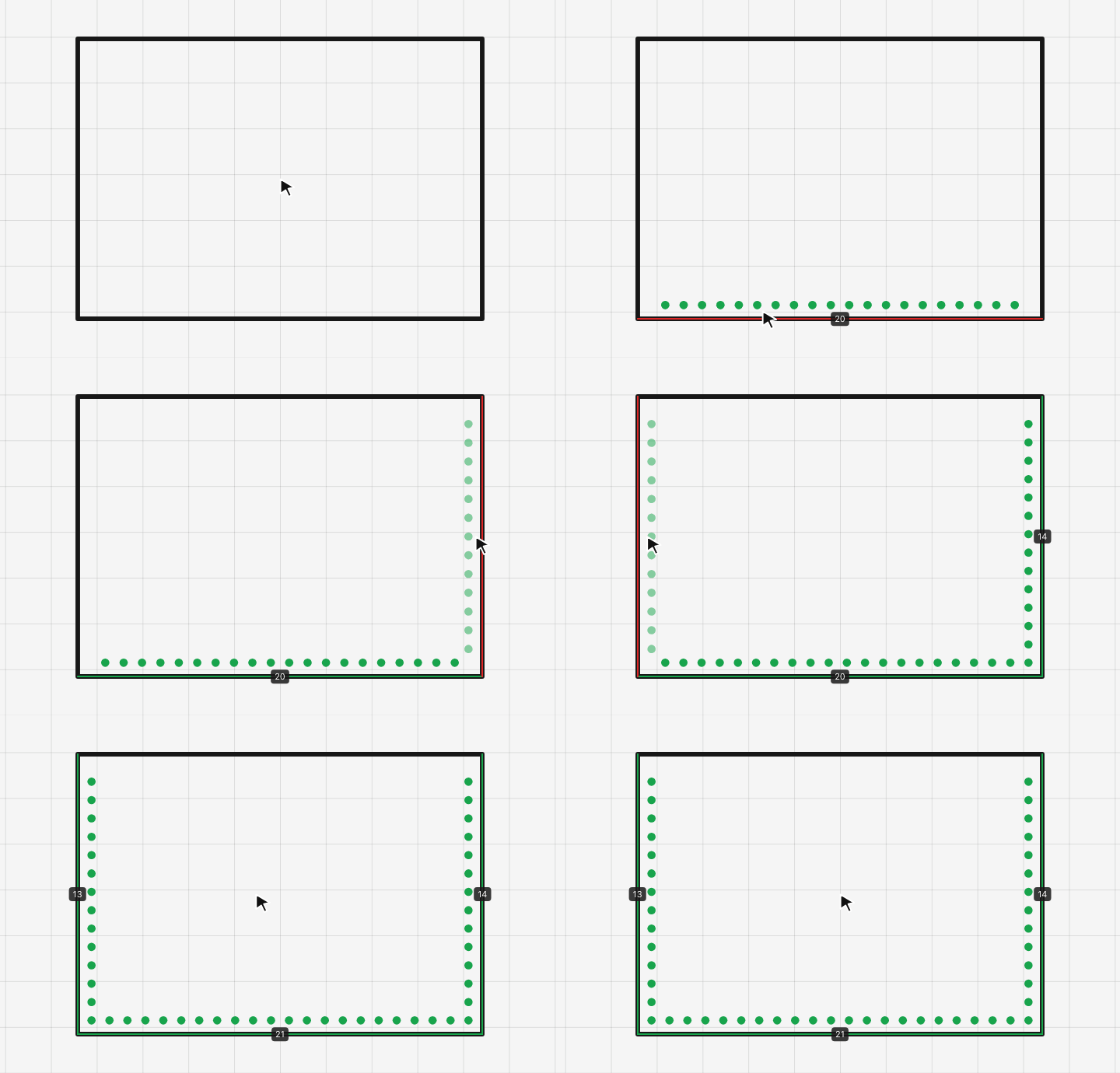
Click the edges you want to sew and EasyPatt lays out every hole. Set the spacing in millimetres or stitches per inch, choose how far the line sits from the edge, and pick round, slit or diamond holes to match your awl, chisels or pricking irons.
Balancing mode nudges the spacing so a hole lands exactly on each corner — no half-stitch at the end of a side. Every side shows its stitch count or stitched length. Checking one seam by hand? Try the stitch spacing calculator.
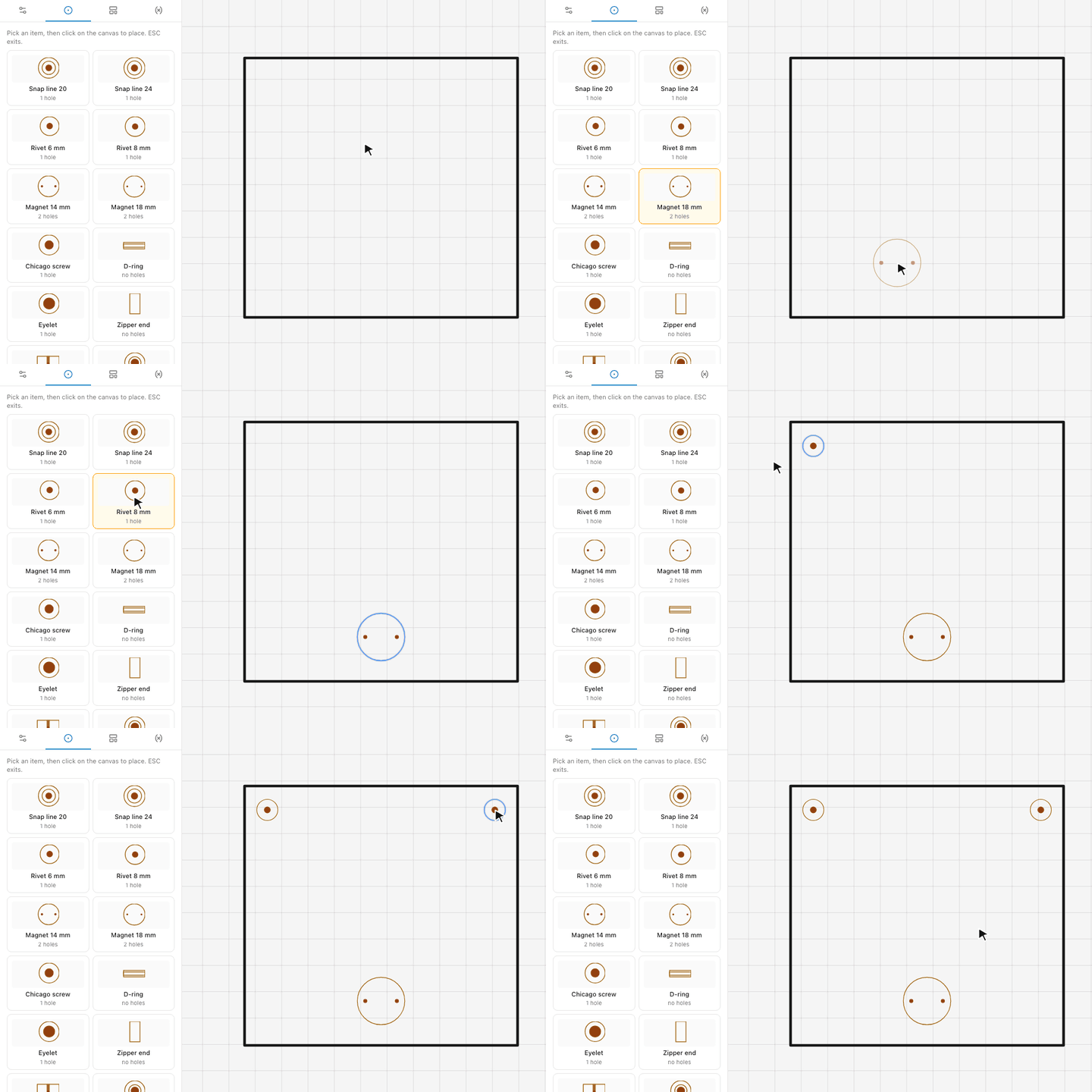
Pick a piece from the hardware library — rivets, press studs and snaps, magnetic clasps, Chicago screws, eyelets, D-rings, buckles — and click where it goes. Each one is drawn at its real size with its punch holes, so the printed pattern shows exactly where to punch.
Alignment guides snap hardware to the centre or edges of a panel, so a clasp sits dead centre on a flap and a pair of rivets ends up the same distance from each side.
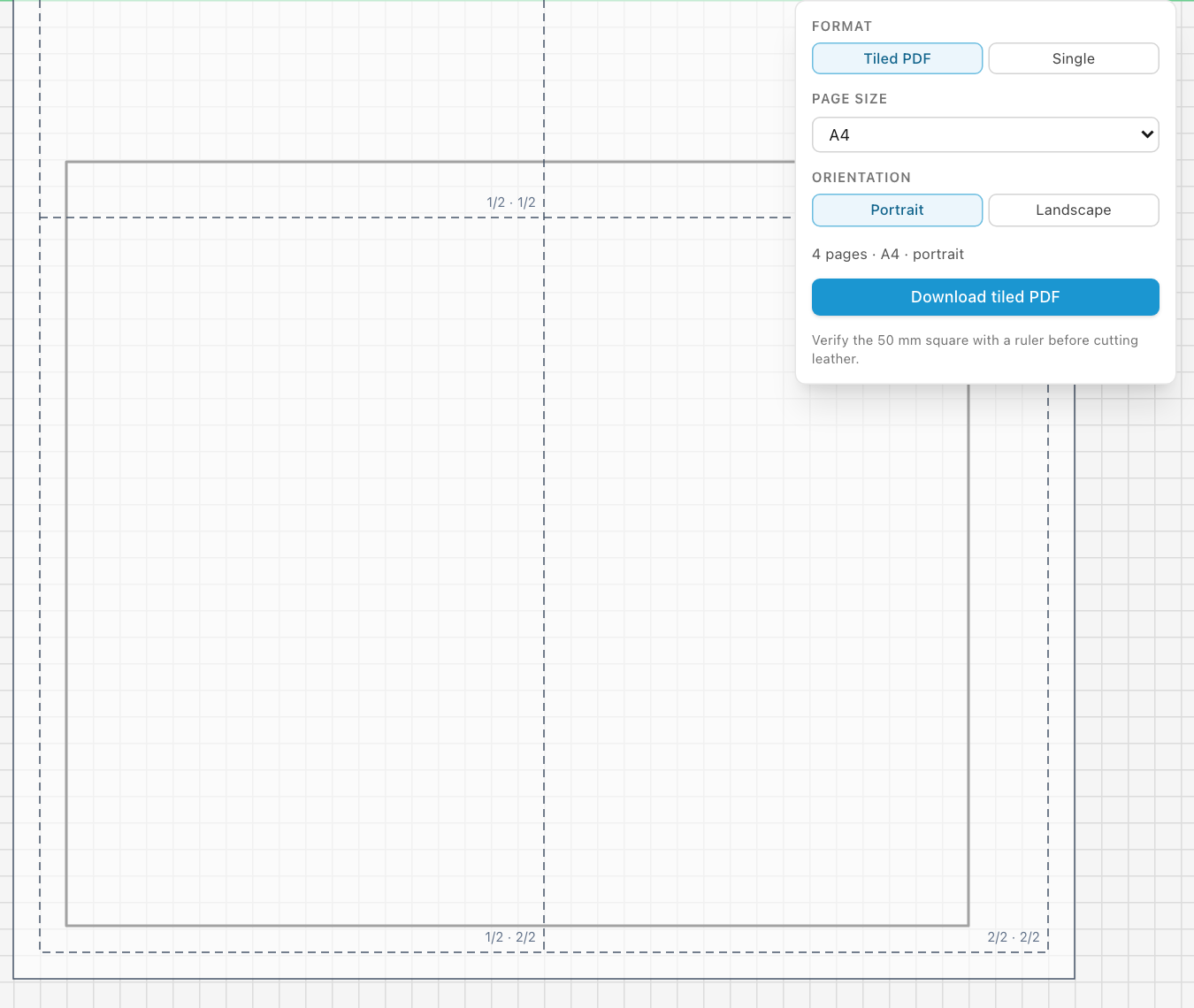
Export a 1:1 PDF on a single page, or let EasyPatt tile a large pattern across A4 or Letter sheets with page labels for taping them together. A 50 × 50 mm calibration square is printed every time: measure it with a ruler, and if it is 50 mm you can cut leather with confidence.
Step by step: how to print leather patterns to scale at home.
New: the Builder
The Builder is the easiest way to start a pattern. Instead of drawing a wallet piece by piece, you pick one and change a few numbers. The pattern is complete from the first click.
Pick a card holder, bifold, long wallet or trifold. Set the closed size, the card pockets on each side and the stitching, or drag the edges of the drawing. Every piece of the pattern is worked out again as you go.
Give a pocket a thumb cut-out, a part its own colour, a folding wallet a liner. There is nothing to draw and nothing to line up by hand.
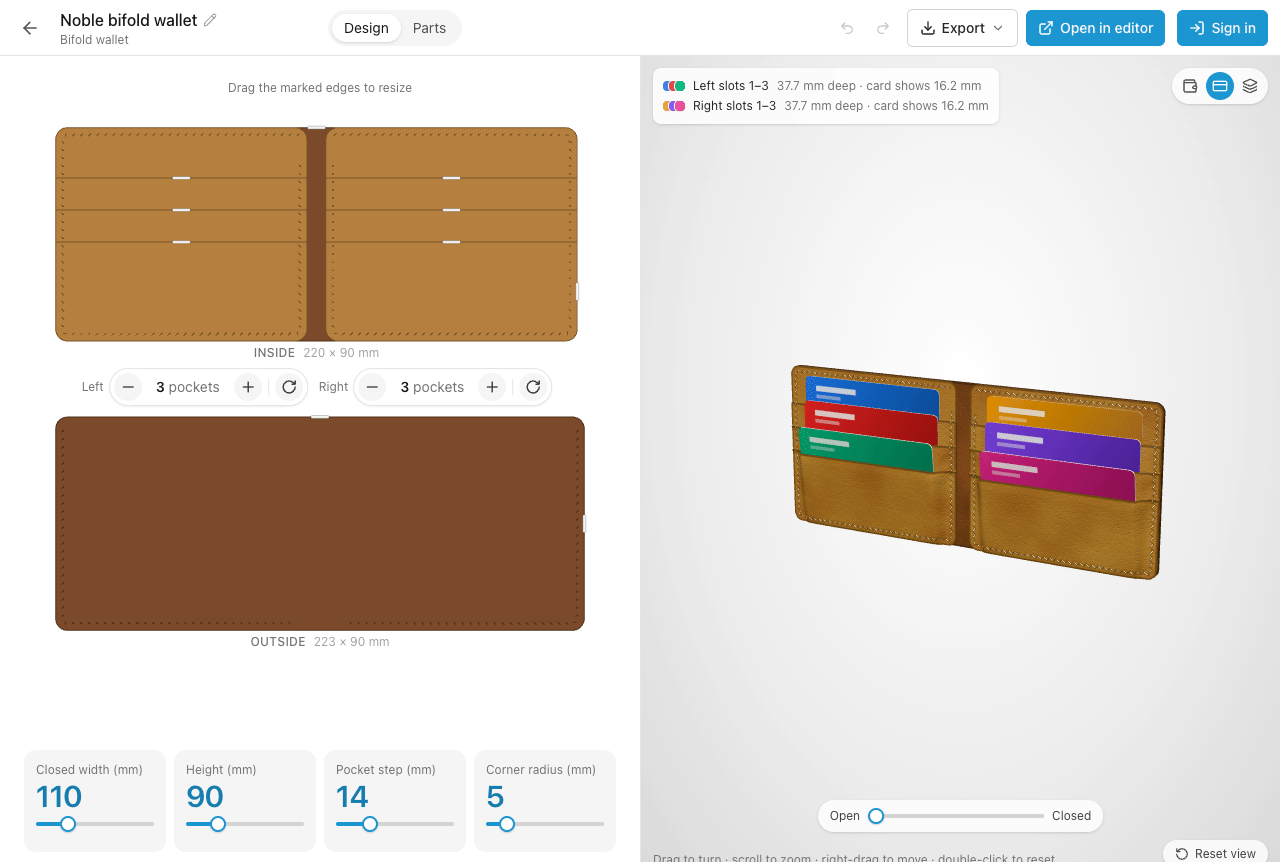
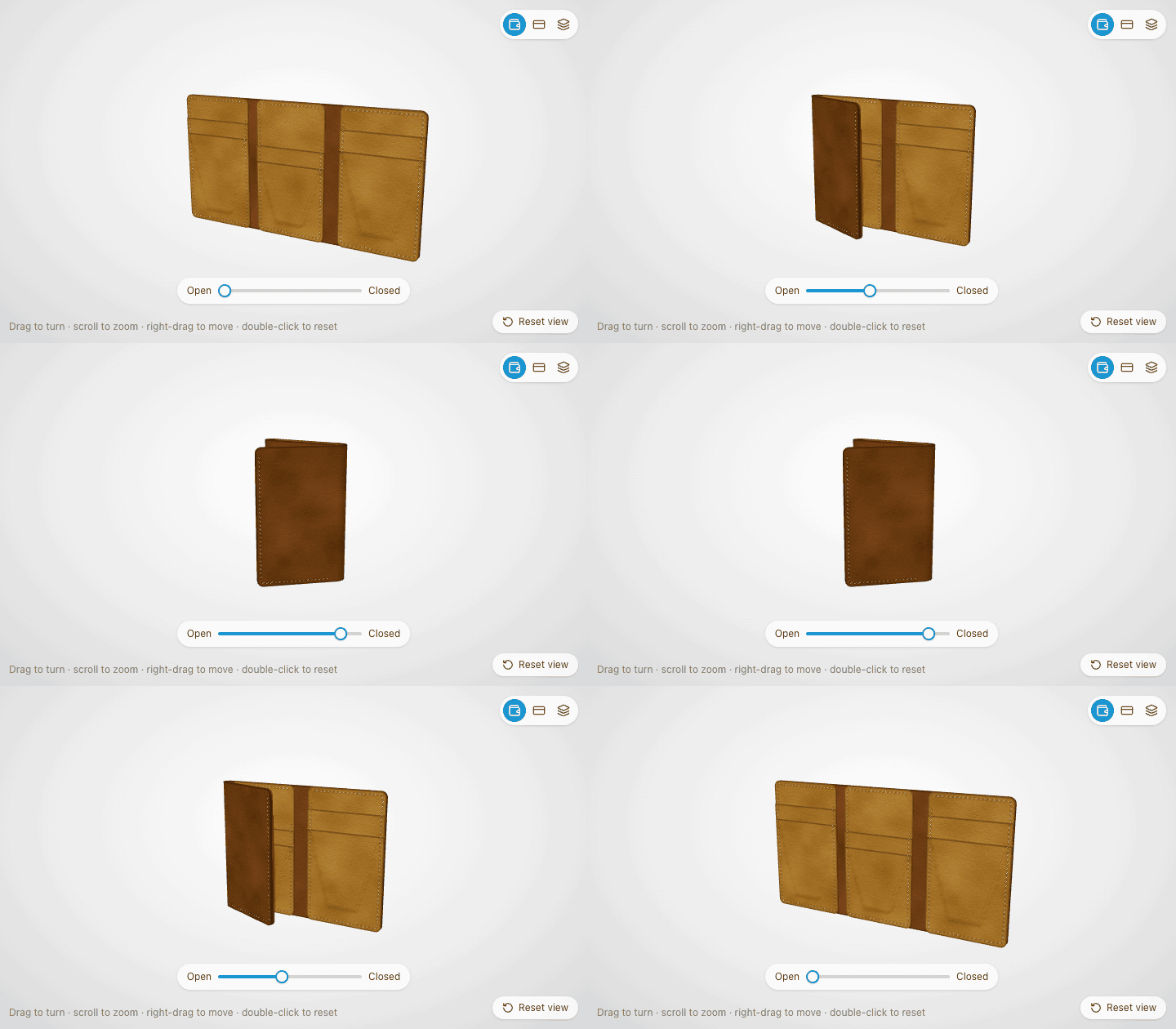
The 3D view shows the wallet in your leather and thread, with a card in every slot and how far each card shows above its pocket.
Open and close a folding wallet with a slider, or take it apart to see every layer in order.
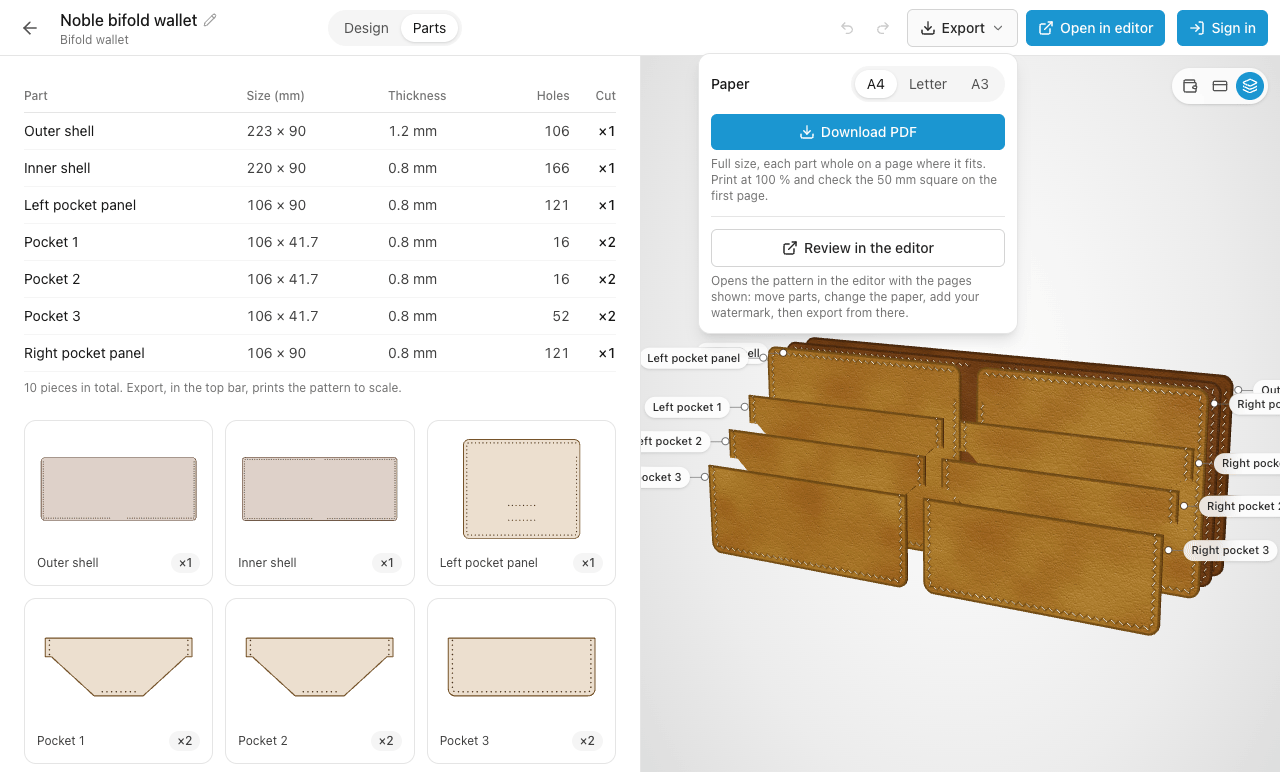
The parts list gives each piece with its size and how many to cut. Download the pattern as a PDF at full size: every part labelled, a 50 mm square to check the print, and stitch holes that land on each other through all the layers.
Want to add hardware or your own details? Open in editor turns the wallet into an ordinary EasyPatt pattern.
Stepped card pockets on both sides and a centre pocket between the two panels.
See the pattern →A pocket stack on each half, a bill compartment the whole length, and a fold that stays free of stitching.
See the pattern →Folds along its long side, card slots side by side, full-length bills lying flat behind them.
See the pattern →Three panels and two folds, cut so the last fold closes over the first without straining.
See the pattern →Each one is a free PDF at full size with the stitch holes lined up through every layer, and each opens in the Builder: set the size, the pockets and the stitching, see the wallet in 3D, and the pattern follows. See all free leather wallet patterns.
Walking and balancing modes along any path, with adjustable spacing, offset, and hole shape.
Define a card width or pocket depth once and reuse it across every panel. Change the value, every panel updates.
Rivets, snaps, magnetic closures, D-rings — pick from the library and place with snap alignment.
Download your pattern as a 1:1-scale PDF — single page, or tiled across A4 or Letter with a 50×50 mm calibration rectangle.
Browse shapes published by other makers and import them into your project. No account needed to browse.
Sign in and your projects sync across browsers and devices. Pick up a pattern where you left off — local-first, no lock-in.
Drop a photo of a piece you want to copy onto the canvas and trace it. Or upload a logo to print right on the pattern.
Set the card width once as a variable and every pocket, lining and outer panel follows. Change it, and the whole wallet pattern updates.
Bag pattern making without size limits: gussets, flaps and large panels print tiled across as many pages as they need.
Long, narrow pieces with evenly spaced holes. Place the buckle, Chicago screws and rivets from the hardware library, and keep both edges stitched identically.
Small parts where half a millimetre shows. Exact dimensions, rounded ends, and stitch holes that finish cleanly at the tip.
Trace a reference photo of the knife or tool, draw the outline around it, and add a welt-side stitch line at a fixed distance from the edge.
Save shapes you reuse as templates with a free account, or browse what other makers have shared in the library and drop it into your pattern.
Which spacing suits which project, millimetres versus stitches per inch, and how to make corners land on a hole.
Read the guide →Printer settings that silently shrink your pattern, tiling across pages, and how to check scale before you cut.
Read the guide →Seam length and chisel spacing in, hole count and the corner-to-corner adjustment out. SPI to mm as you type.
Open the calculator →Inkscape, Illustrator, Fusion 360 and EasyPatt for leather work: what each is good at and where it slows you down.
Read the comparison →Yes. EasyPatt is free to use. It is built by a leather maker, for leather makers.
EasyPatt runs in any modern browser. Chrome and Edge are recommended because they support the File System Access API, which lets you save and open .lpat project files directly. Safari and Firefox work too, with a download-upload fallback for files.
Yes. The tile-print feature lays large patterns out across multiple A4 or Letter pages, with a mandatory 50×50 mm calibration rectangle on the first page. Measure it after printing — if it is 50 mm, your prints are to scale and you can cut leather with confidence.
No. EasyPatt is online leather pattern software: open it in your browser and start drawing. There is nothing to download, and you can use it without an account. Signing in only adds cloud saves.
Yes. Set the spacing in millimetres or stitches per inch and EasyPatt places every hole along the edge. Balancing mode adjusts the spacing slightly so holes land exactly on the corners, and each side shows its stitch count or stitched length.
Both. Patterns can be any size. Large pieces such as bag panels and belts are tiled across as many A4 or Letter pages as they need, with page labels so you can tape them together.
Semi-pro and Etsy-scale leather makers who design their own patterns — wallets, bags, straps, watch straps, sheaths. EasyPatt sits between generic vector editors like Illustrator and pro CAD like Fusion 360: simple to learn, but with the leather-specific features that generic tools cannot offer.